- Reading time:
- 6 minutes
Share this post
AI, Computer Vision, Self-Healing: Speeding Up Issue Resolution During and After an Oracle Forms Migration
14 October 2026

Sandra Schroeter
Senior Product Marketing Manager
The people who know a legacy system are fewer every year, yet the change requests keep coming, and during an Oracle Forms migration two systems need support at once. This post shows how Issue Analysis, the AI coding assistant, Klicker, and self-healing take a ticket from first look to a tested fix, with an engineer approving what reaches production.
A migration should have an end date. Support and maintenance shouldn’t.
It sounds obvious, but what does this actually mean? Let’s take a step back and look at why support and maintenance matter in the context of migration.
Keeping a legacy system running has been getting harder, and the first reason is expertise. The people who know these systems are fewer every year. For many modules, only a handful of engineers, and sometimes only one, understand how they work. Some experts are close to retirement. Others have already left, and their legacy knowledge went with them.
The second reason is constant change. The database version reaches end of life. A connected system is replaced. A new e-invoicing requirement arrives, and a trigger nobody documented has to be updated. Every change arrives as a ticket, and even if there are only a few, each one lands on whoever is left. That is why IT teams have to ensure the system can be supported and maintained before, during, and after migration.
During a migration, two systems need support in parallel: the Forms modules that haven’t moved yet and the migrated ones, many of which go live with a backlog of change requests the business saved until after cutover.
In this post, we'll cover three Kodesage capabilities that speed up issue resolution — with an engineer in control:
- Issue Analysis summarizes and analyzes tickets and suggests a solution. Then an AI coding assistant helps build it.
- Klicker uses computer vision to automate UI tests and support QA engineers, even for legacy applications like Oracle Forms.
- Self-healing combines all of the above and can act on new tickets to develop and test a fix for an engineer to approve.
The capabilities start from the same place: system knowledge. So how does Kodesage know the system?
How Kodesage knows the system
Kodesage builds a knowledge base from the source code, the database schemas, the documentation, and the issue tickets. It updates as the code changes, so it reflects the system as it is today.
For a legacy system, that gives the team something to ask when the people who knew a module are no longer there. How does this module work? What does it touch? Why does this rule exist?
Issue Analysis, the AI coding assistant, and self-healing all draw on this knowledge as context, which improves both the quality of the result and the speed of resolution.
During a migration, two systems need that knowledge. The Forms application has its own. After cutover, Kodesage rebuilds the knowledge base from the migrated application’s new code, schemas, documentation, and tickets, so support on the new platform starts equally well prepared.
The knowledge base runs on-premises or in a private cloud, so tickets, code, and business logic stay in a secure environment. Our earlier post, How to Avoid Paying Twice for AI-Powered Oracle Forms Migration, explains why that matters.
AI: from ticket to solution
When a ticket arrives, the first job is to understand it. Issue Analysis integrates with Jira or another ticketing system, summarizes the ticket and its comments, then analyzes it based on its knowledge about the system and suggests a fix or implementation solution.

Take the e-invoicing requirement from the introduction. Issue Analysis finds the trigger behind the calculation, lists the tables it reads and the modules that call it, and suggests how to change it. An engineer who has never opened that code starts with the full picture and a proposed solution.
Kodesage’s AI coding assistant then helps build it, reducing time to fix by up to 60%.

The AI coding assistant works through the Kodesage CLI, in the engineer’s local files, and draws on the same knowledge base as the analysis. The session is interactive, so the engineer can adjust the approach and ask for changes. The assistant runs in a sandbox with defined permissions, and every change the CLI commits is version-controlled and attributed to the assistant, so each one is easy to identify.
The same assistant can work on the Forms project as well as on the target project, so one tool covers both systems during a migration.
The assistant creates the change. The engineer decides what gets deployed.
Computer vision: UI test automation with Klicker
A change isn’t finished when the code is written. Someone has to verify how it works on the screen.
Klicker is a visual test agent that reads a screen like a human: it opens the application, follows a test case, and checks what appears in the UI. It supports QA engineers by handling the repetitive clicking and checking.
Test cases are plain-language text files that can live in Git next to the code, so anyone with knowledge of the application’s intended behavior can write them without code. Klicker can also generate test cases itself.
It works on a thick client like Oracle Forms just as it does on a modern web front end. That matters during a migration, when both types of application exist at the same time.
Klicker records every click it makes as a screenshot and gives a test result at the end, so an engineer can confirm the outcome and review the test flow if necessary.

Self-healing: a tested fix, ready for approval
Self-healing combines the capabilities above and goes further. A new ticket can trigger Kodesage’s self-healing process:
- analyze the ticket
- develop a solution from system knowledge
- build the solution
- deploy it to test
- test it, using Klicker for the UI
- present the result to an engineer for approval
After approval, the change goes to production. Whether an engineer or self-healing deploys it is up to you
Take another change from the introduction: a connected system is replaced. A ticket arrives in Jira reporting that records from the connected system are being rejected. Self-healing analyzes it and finds the code that exchanges data with that system, the module that calls it, and the fields affected. It adapts the code to the new format and takes the change through build and test, with Klicker covering the UI. The engineer receives the analysis, the change, and the test results together, and approves it, adjusts it, or sends it back with feedback for a new attempt.
Self-healing works when the ticket and the system knowledge are enough to define the fix. A new requirement, such as the e-invoicing change, needs someone to decide what the application should do. When the ticket already spells that out, self-healing can handle it too.
What to take away
Kodesage’s knowledge of the system feeds the analysis, the coding assistant, and self-healing, before and after cutover, and it stays in a secure environment. Combined with Klicker testing the UI, issue resolution gets faster at every step, from the first look at a ticket to a tested fix.
Plan support as part of the migration
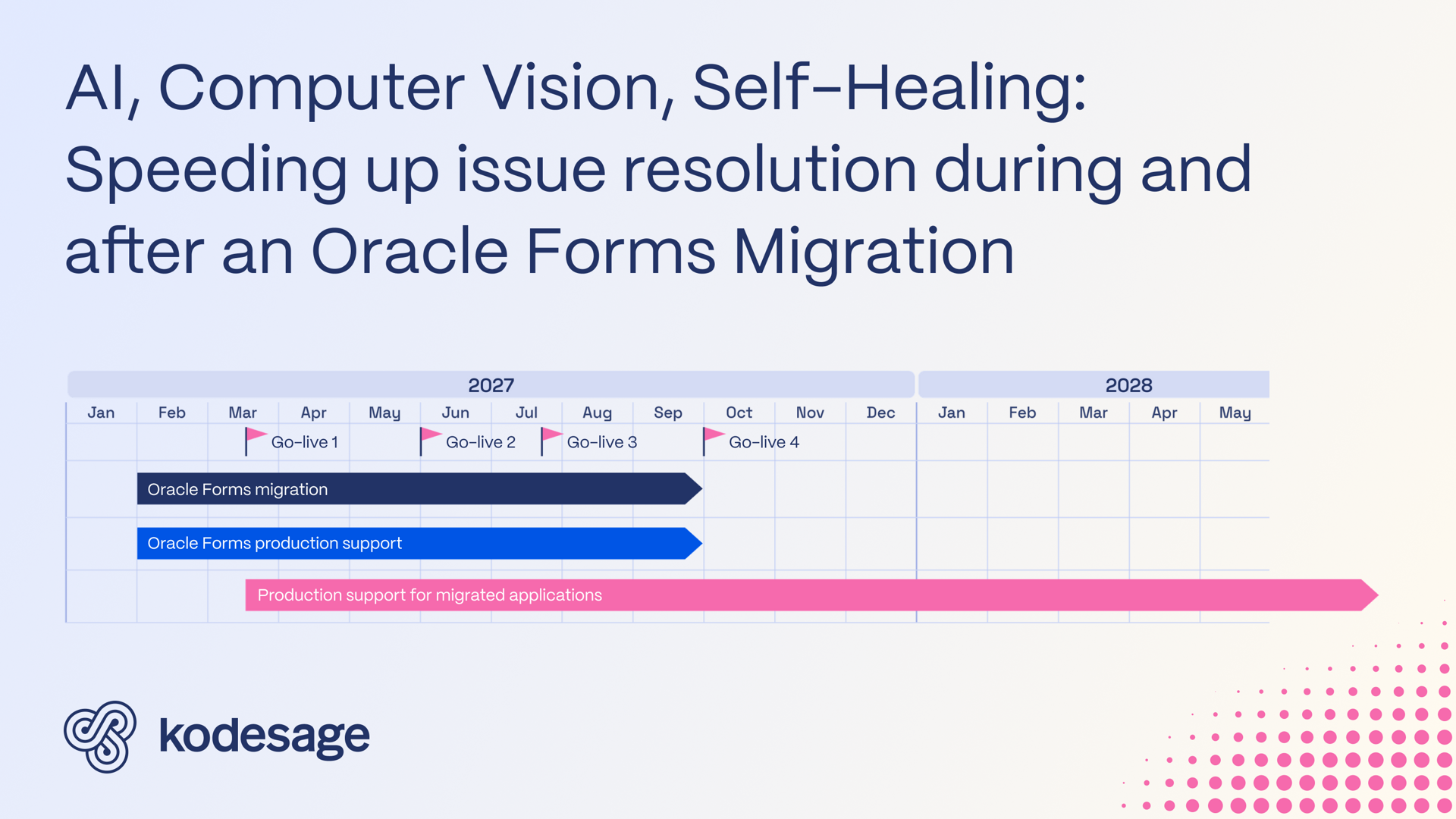
Depending on the size of the portfolio, a migration project with Kodesage typically takes 6 to 12 months. During that time, the legacy system still needs support and maintenance. So do the new applications, as soon as they are deployed.
If you plan for that scenario from the start, and choose a technology that can handle both systems, the knowledge of how each system works becomes available to every engineer, so resolving a ticket depends less on the few people who know the legacy system. Changes that arrive during the migration, such as a new e-invoicing requirement, also take less time to resolve. And the backlog of change requests saved for after cutover meets a team that is ready for it at go-live.
If you’re planning a migration, book a call and we’ll look at how Kodesage can support the systems on both sides of it.
Why choose Kodesage?
Deep Legacy Code Intelligence
Kodesage supports legacy stacks like Oracle Forms, COBOL, PowerBuilder, SAP, PL/SQL, and also modern stacks.
Secure On-premise Deployment
Single tenant application, offering both VPC and fully on-premise deployments meeting the strictest security requirements.
Living Knowledge Base
Connect to the entire codebase, issue ticketing systems like Jira, databases, tests, wikis like Confluence and upload documents.
Automated Documentation
AI generated software documentation that is always up to date with a pre-built and editable document template library.

Regression Test Automation
Automate regression and unit test coverage, accelerate releases and ensure traceability for future audits.
AI-powered Issue Ticket Analysis
Native integration to systems like Jira, and AI-generated fix recommendations for tickets.
Start transforming your legacy systems
With Kodesage teams maintain legacy projects more efficiently, and modernize faster.
See it in action today.